---
title: "Corporate Carbon footprint -> Log Entries Overview (LEO): Monthly Data Split "
description: Merged Input
---
[Skip to content](https://resources.cozero.io/wiki/log-entry-overview-leo-monthly-data-split-#main-content)
- [English](https://resources.cozero.io/wiki/log-entry-overview-leo-monthly-data-split-)
- [Deutsch](https://resources.cozero.io/de/wiki/log-entry-overview-leo-monthly-data-split-)
English
Show submenu for translations

Open main navigation
Close main navigation
- - [English](https://resources.cozero.io/wiki/log-entry-overview-leo-monthly-data-split-)
- [Deutsch](https://resources.cozero.io/de/wiki/log-entry-overview-leo-monthly-data-split-)
English
Show submenu for translations
- [Contact us](mailto:support@cozero.io)
[Contact us](mailto:support@cozero.io)
How can we help?
- There are no suggestions because the search field is empty.
1. [Cozero Wiki](https://resources.cozero.io/wiki?hsLang=en)
2. [Product guide: Log](https://resources.cozero.io/wiki/product-guide-log?hsLang=en)
3. [Corporate Carbon Footprint (CCF)](https://resources.cozero.io/wiki/product-guide-log?hsLang=en#corporate-carbon-footprint-ccf)
April 21, 2026
# Corporate Carbon footprint -\> Log Entries Overview (LEO): Monthly Data Split
#### **Overview**
Users often need to analyze and export **monthly or quarterly** slices of their activity (e.g., “Purchased Electricity inputs from November 2024” or “Q4 emissions against company vehicles”). With this feature customers can now isolate **fractional emissions, inputs, energy consumption, and spend** for a specific date range.
The **Monthly Data Split** capability enables users to apply a date filter and instantly see the **fraction** of each log entry’s values that falls within the selected period — both **on the interface** and in **CSV/XLSX exports**.
#### **Key Capabilities**
- The following data points in LEO are now **splittable by month**:
- Emissions (tCO₂e)
- CBAM emissions (tCO₂e)
- Location-based emissions (tCO₂e)
- Biogenic emissions (tCO₂e)
- Energy consumption (kWh)
- Spend data
- **Merged Input** (all single-input and selected multi-input use cases)
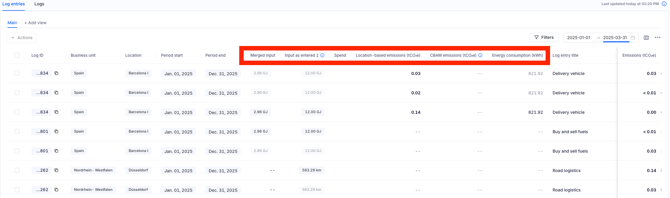
- You can now use the **date filter** to view **fractional values** for emissions, spend, input and energy consumption that correspond **only** to the selected date range.
- A new **Merged Input** column displays the unified input even when a log entry was created using multiple inputs.
*Example:* If a sea freight entry was logged using *tonnes* and *kilometres*, **Merged Input** will show *tonne‑kilometres (tkm)* for mathematically correct aggregation.
- Original input columns are now labeled **Input as entered**. These show values exactly as logged and are **not** split when changing the date filter (to preserve mathematical integrity).
- The same splitting logic applies to **LEO table view** and **CSV/XLSX exports**.
#### ** Video Walkthrough:**
#### **Step‑by‑step: Using Monthly Data Split in LEO**
1. **Open LEO**
Navigate to **Log → Log Entry Overview (LEO)**.
2. **Apply a date range**
Use the **Date filter** at the top of the table. Choose a preset (e.g., *Year-to-date*, '*Last 12 months'*) or **Custom range** (e.g., *Nov 1–30, 2024*).
**Result:** Splittable metrics automatically display the **fraction** of each log entry that falls inside your selected range.
3. **Show relevant columns**
Click **Columns** and ensure these are visible:
- **Emissions (tCO₂e)**, **CBAM emissions**, **Location‑based**, **Biogenic**
- **Energy consumption (kWh)**
- **Spend**
- **Merged Input ('Inputs' should be added to the visible columns)**
4. **Filter or search as needed**
Combine the date range with other filters (e.g., **Category/Subcategory**, **Responsible user**, **Supplier**, **Business activity**) to answer targeted questions.
5. **Review fractional results**
For the selected period, check the values in the splittable columns (all numerical columns in the table). These represent only the portion that overlaps your date window.
6. **Export your slice**
Click **Export → CSV** or **Export → XLSX**. Your export respects the **date filter** and includes the same monthly split logic.
*Tip:* Use XLSX when you plan to pivot/analyze further in spreadsheets or feed into ESG tooling.
7. **Save as view**
Navigate to **'Main'** on the table. Click on **Duplicate View.** This will create a new view (with the name of 'copy of main', you can rename this to any value) existing of the same filters and date range for later use. The view is now saved and can be reviewed/changed for later use
8. **Reset filters**
Clear the date filter to return to full-period totals when needed
**FAQs**
**Does the split change my stored data?**
No. It only affects how values are **displayed and exported** for the selected date range.
**Why aren’t the ‘Input as entered’ columns split?**
To maintain mathematical correctness of the original input entries. Use **Merged Input** for aggregation across mixed units.
**Do saved exports keep the same logic?**
Yes. Exports reflect your current filters and monthly split logic.
#### **Questions or feedback?**
Our goal is to make sure you know what's happening with your emissions data. If you have any questions, concerns, or ideas, just reach out to us at **[support@cozero.io](mailto:support@cozero.io)**. We're here to make this feature even better based on your feedback.
- [Cozero emission categories](https://resources.cozero.io/wiki/cozero-emission-categories?hsLang=en)
- [Product guide: Log](https://resources.cozero.io/wiki/product-guide-log?hsLang=en#main-content)
- [Introduction](https://resources.cozero.io/wiki/product-guide-log?hsLang=en#introduction)
- [Setting up your organization](https://resources.cozero.io/wiki/product-guide-log?hsLang=en#setting-up-your-organization)
- [How Tos](https://resources.cozero.io/wiki/product-guide-log?hsLang=en#how-tos)
- [Corporate Carbon Footprint (CCF)](https://resources.cozero.io/wiki/product-guide-log?hsLang=en#corporate-carbon-footprint-ccf)
- [Product Carbon Footprint (PCF)](https://resources.cozero.io/wiki/product-guide-log?hsLang=en#product-carbon-footprint-pcf)
- [Product guide: Dashboard](https://resources.cozero.io/wiki/product-guide-log?hsLang=en#product-guide-dashboard)
- [Cozero features](https://resources.cozero.io/wiki/product-guide-log?hsLang=en#cozero-features)
- [Product guide: Act](https://resources.cozero.io/wiki/product-guide-act?hsLang=en)
- [Product guide: Share](https://resources.cozero.io/wiki/product-guide-share?hsLang=en)
- [Product guide for Suppliers](https://resources.cozero.io/wiki/product-guide-for-suppliers?hsLang=en)
- [Knowledge base](https://resources.cozero.io/wiki/knowledge-base?hsLang=en#main-content)
- [Climate knowledge](https://resources.cozero.io/wiki/knowledge-base?hsLang=en#climate-knowledge)
- [FAQs and glossaries](https://resources.cozero.io/wiki/knowledge-base?hsLang=en#faqs-and-glossaries)
- [Regulations](https://resources.cozero.io/wiki/knowledge-base?hsLang=en#regulations)
[](https://www.cozero.io/)
Copyright © 2025, Cozero GmbH